Is the Smartphone Industry ‘Curious’ about Curiosity?

The world holds its breath as the next battle for dominance in the smartphone industry begins with the launch of the Samsung Galaxy S4. Apple recently defeated Samsung in a patent lawsuit involving user-interface elements. Samsung lost the battle, but they don’t necessarily have to lose the war. Samsung will not fade away into the night without putting up an aggressive fight. Samsung plans to sue Apple on its using the LTE (a technology for faster data speeds called Long-Term Evolution) chip in the iPhone 5.

As the smartphone war rages on, it is evident that there are many areas where industry giants compete for dominance – user-interface, operating system, physical design, connectivity, storage, and camera.

But there is one area where companies haven’t done much – the battery. Until the smartphone industry invests heavily into battery technology, devices are limited to what they can do on a single charge. Lithium-ion batteries are used extensively in all smartphones as of today. The life of a single charge is a few hours (assuming a user talks, texts, and uses data connections such as Wi-Fi or 3G/LTE). After a smartphone runs out of battery, users have no option but to carry a charging cable, USB charger, portable USB charger, a battery pack (like Mophie), or just wait to reach home to charge the phone.

Talking about battery life, the smartphone industry can learn a lot from the Mars Rover Curiosity. Curiosity has reached Mars and has starting sending photos, conducting experiments and, exploring the Martian mountains. For doing all this, Curiosity needs one thing – power.

Previous generations of Mars Rovers used solar panels to power various devices. However, dust settled on the solar panels making them inefficient. Also, note that the Sun looks much smaller from Mars as Mars is at a greater distance from the center of the solar system. Smaller sun = less light = less solar power.

To solve this problem of inefficient solar power, Curiosity uses a Multi-Mission Radioisotope Thermoelectric Generator (MMRTG). Simply put, Curiosity uses the radioactive isotope Plutonium-238 as the raw material. Heat is automatically generated due to the natural decay of Plutonium-238. A device called a Thermocouple uses this heat to generate electricity. The Plutonium-238 is well shielded, and the heat – and not the radiation – is used to generate electricity. This device can last for 14 years without requiring any maintenance! Curiosity will constantly receive its power until Plutonium-238 completely decays.

Now, coming back to the smartphone industry, why can’t we design something like this for smartphones? Imagine having a very small amount of radioactive isotope that is well-shielded and attached to the smartphone. The device could then, theoretically, produce electricity for at least a year (or more!). Instead of battery packs like Mophie, we could have smartphones that generate their power and don’t need a recharge! Depending on the stability of the technology, we could have a smartphone that could last for years without a recharge. You buy a smartphone and dispose of it after a few years without charging it even once.

When I told my wife about this idea, she said, and I quote: ‘I am not carrying a nuclear bomb in my pocket!’. Well, what I am proposing is not exactly a nuclear bomb since there is no chain reaction like nuclear fission or nuclear fusion going on. The natural decay of Plutonium-238 generates heat and hence the power. Theoretically, a well-shielded pack of Plutonium-238 is safer than batteries that we have today. The current batteries have greater chances of exploding than a well-shielded pack of Plutonium-238!

The future of the smartphone industry is uncertain. There are no obvious winners as of today. In my opinion, only the company that designs and patents advanced battery technology will emerge as the winner. The company holding the key to advanced battery technology will be the undisputed winner and will rule the smartphone industry for generations to come. Simply because, more power equals to more things the smartphone can do without dying.

Hey Apple and Samsung – are you listening? Hopefully, I can expect to be paid a billion dollars for my idea!

(MMRTG Source: http://mars.jpl.nasa.gov/msl/mission/technology/technologiesofbroadbenefit/power/)

Edited by: Prarthna Sri

Auditing in a touch-screen world!

Every time I inspected a home before renting it out, or even before buying it, I wish I had a quick checklist of repairs or cleaning required. In the absence of a checklist, there was no perfect way to record the defects in a house. Not having a checklist would lead to problems later – if both parties do not agree to defects. For example, you may have to pay for the stain on the carpet that was not your fault.

I found this amazing app called iAuditor. The iAuditor has a few built-in checklist that can be filled out using an iPad or an iPhone. The UI is a very simple and intuitive:

20120430-011328.jpg

I started a new Audit. The App has a few built-in checklists (you can also create your own customized checklist):

20120430-011531.jpg

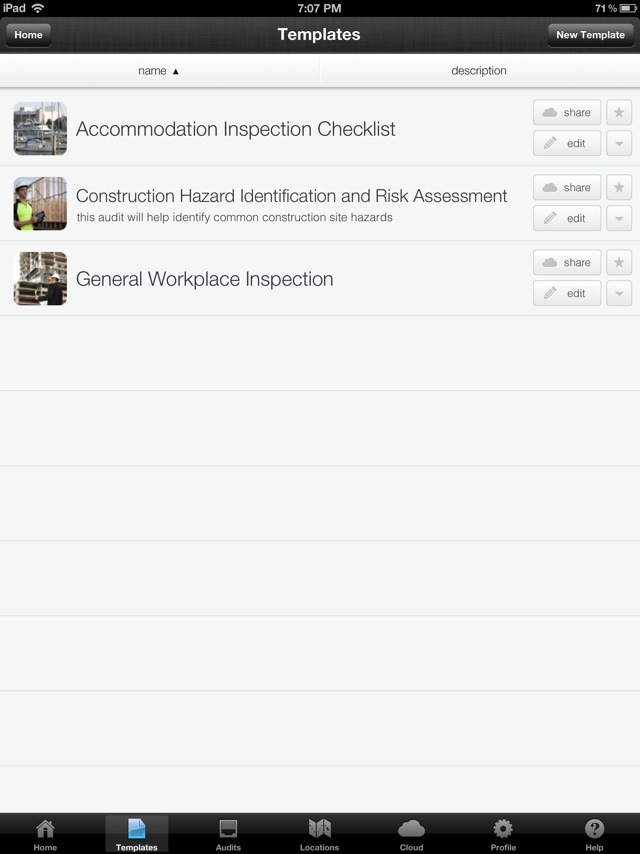
I decided to try out the Accommodation Inspection Checklist:

20120430-011632.jpg

The checklist has the following options: Yes, No and Not Applicable. Selecting No gives an option to directly add photographic evidence of non-compliance by clicking the Camera icon.
20120430-012911.jpg

There is also an option to add additional comments. An interesting feature of the App is the option for both parties to add signatures directly from the iPad!

20120430-012104.jpg

Once both parties have signed on the Audit checklist, the App gives an option to directly export to PDF. This is how an exported PDF looks:

20120430-012246.jpg

As a Technical Writer, I am extremely impressed by the perfectly formatted PDF output. I can imagine hundreds of good uses for this App in business. The following uses come to my mind:

– Safety Inspection
– Regulatory Compliance
– Manufacturing
– Pharmaceuticals
– Construction
– Real Estate

In addition to the above business uses, this App can be used in personal situations as well.

The next time you check out a home for rent, make sure to carry your iPad or iPhone. Using the iAuditor App, carefully track the defects that need to be fixed. If not, don’t be surprised if you are dinged for a stain on the carpet that existed before you moved in!

Computer Technology is Imperfect

Computers have been around for a few decades now. But computers – unlike other devices  at home – don’t seem to be as reliable.

Here are a few examples of devices at home that always work as designed:

  • Television–  Switch it on, select the channel and you are ready to go. A TV is very consistent in its function whether it is an LCD, Plasma or an LED TV. A TV has become more like a computer since apps can be installed on some TVs. Some TVs have Wi-Fi or Ethernet built in.
  • Blu-ray player – A Blu-ray player works perfectly each time. These days, a Blu-ray player has apps like Netflix and YouTube that connect to the internet.

The above devices work perfectly fine. If they break down they don’t work. But as long as they work, they are fine and do their job. Using each of the above devices is very easy since they don’t change their settings or mutate on their own.

Let’s compare these devices to a computer. The following issues make a computer extremely complex and frustrating to work with:

  • Accidental misconfiguration– Sometimes, we make changes to the settings on our computer and we are unable to roll them back. A typical computer has hundreds of settings and an average computer user may not be familiar with all of them. If we delete important system files, the computer never turns back on.
  • Malicious misconfiguration – Other users may use your computer and make changes to settings without your knowledge.
  • Virus– Viruses not only modify your computer settings, but also corrupt data.
  • Spyware – Unsafe emails and websites install sypware on your computer that is later used to steal data.
  • Malware – Malware is installed by hackers to take control of your computer and propagate their illegal activities and steal your data.
  • Crash – When your operating system crashes, you have to reboot. This corrupts your operating system and programs.

A computer, due to all the above issues is an imperfect piece of technology. We have sent a man on the moon, but we have still not developed a computer, operating system, or a program that is perfect! Is there a solution out there that makes computer technology perfect?

Yes. Reboot to Restore technology transforms the imperfect computer technology into something reliable and perfect. Just reboot your computer and your operating system, programs, and the entire computer comes back to its original configuration.

Reboot to Restore technology would have been very useful when Neil Armstrong went to the moon. If the computers on his spacecraft had problems, he could just reboot!


Milk, Diapers, and an iPad

During my recent visit to the Apple store, I saw Apple experts demonstrating an iPad to a group of kids and their parents. I increasingly see kids holding iPads instead of toys. An iPad is expensive, and fragile. I was curious see how a 2-year old could use an iPad. Most importantly, I was also curious to see if an iPad App was simple to use for a kid.

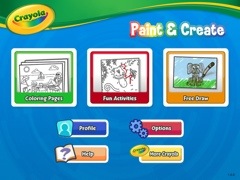
I downloaded Crayola Paint and Create – a free App for the iPad. I was interested in studying the features, user interface, user interaction, and the overall user experience. This is how the App looks:

20120421-192410.jpg

The main elements were Coloring Pages, Fun Activities and Free Draw. I decided to use Coloring pages and color a drawing:

20120421-192638.jpg

I clicked the Crayola icon at the bottom of the screen to display various types of crayons with different colors. You can see the following icons on the right: Pause (to pause the movements like snow falling or pause other interactive elements), Undo, Redo, New, Settings, Share (to share via email or on Facebook), Help, and Exit.

20120421-192912.jpg

This is how a partially colored coloring page looks:

20120421-193208.jpg

I could easily use different colors and fill different parts of the page with solid colors. This is how a fully colored page looks:

20120421-193451.jpg

The app is configured to use a finger by default. There is also a setting to use an iMarker instead of a finger (an iMarker is like a pencil that can be used with the iPad). Obviously, the Help and Settings are a little complicated for kids since they may not be able to read. Apart from Help, Settings, and Share, the other options were extremely easy to use.

What is Apple’s strategy to promote iPads for kids by launching a Kids Corner in the Apple store? What is the value proposition for parents to purchase such and expensive device for their kids? Here’s what I think:

Get an Apple user for life – That’s right. Catching them young will ensure they are Apple users for life! Kids will never choose an Android device or another tablet if they are introduced to the iPad at the age of 2. Apple’s strategy of catching users at a very young age will lead to huge revenue for years to come.

Reduce cost per user – The cheapest iPad costs approximately 400$. If a family of four – two parents and two kids use an iPad, the cost of buying an iPad is divided by 4. Although families do not use terms like Cost per User to decide whether to buy an iPad, they definitely calculate it sub-consciously.

Tap a new market segment – Kids are a huge market segment – not just for games, but also in the field of education. Tapping this market segment leads to a huge revenue for Apple.

Use kids to market the iPad and Apps – I was amazed to see how Apple was using kids to market the iPad. With the Share option, kids could share their coloring pages with their friends (the parents might share it for them). Other kids looking at these colorful pages would want to do the same. Not only is Social Media being introduced at a very young age, the iPad is being marketed via Word of Mouth (the most powerful way to influence prospective buyers).

Save money for families and schools – Families and schools can save money on paper, crayons, and other consumables required on a daily basis.

A safer option – Kids (at home or in Pre-K) eat crayons that may be harmful for their health. Since the crayons on an iPad are electronic, it is very safe for kids.

Save the environment – Reducing the usage of paper obviously save trees.

Crayola Paint and Create gave me great insights to Apple’s strategy. I could also envision the future – where most of the interaction happens through touch screens instead of keyboards. It also helped me realize that language will never be a barrier for user interaction since expressive icons are a great way to communicate with the user. Intelligence, knowledge, skills, language, and education will never be a barrier for users in the world of touch screens.

Hello kids, welcome to the iWorld!

Turn your home wiring into a computer network!

I was watching Netflix the other day when it started buffering frequently. In this day and age, a constant wireless speed should be a given. We have put a man on the moon, but we can’t have constant wireless speed even within the same apartment

I did some research and discovered that many devices interfere with wireless signal. Wireless signal – by its nature – travels through air, and is subjected to interference from other devices that also create wireless signals. The list includes cordless phones (the main culprit), microwave ovens, computers, Bluetooth devices, television sets, speakers, air purifiers, home wiring, fans, and numerous devices we use at home on a day-to-day basis.

If only I could wire my entire apartment with Ethernet. It’s an expensive proposition – but is it worth it? Are there any alternatives?

Yes. I found a very cool solution to turn my home wiring into a computer network. The home wiring can carry data like the Ethernet and provide faster speeds than wireless. I installed a D-Link PowerLine AV 500 4-Port Gigabit Switch Kit. The configuration was extremely simple:

  • Step 1 – Transmitter: I plugged in the white device to a power plug near my cable modem/wireless router. I plugged in an Ethernet cable from this device to the cable modem /wireless router.
  • Step 2 – Receiver: I plugged in the black device to a power plug near my TV/Blu-ray. I plugged in an Ethernet cable from this device to the Blu-ray.

And voila! My Blu-ray was connected over Ethernet! I could now get a veryhigh Internet speed at my Blu-ray. Netflix never buffered again.It is amazing that my home wiring can actually be used as an Ethernet network. I am sure this is useful for people in large homes. Imagine working on a weak wireless signal on the second floor room when your router is in the basement. The Powerline Ethernet adapter will solve the problem. You could buy multiple receivers and plug them throughout your home. You can also build a nice network to share Internet data, music, movies, and files across multiple users in your home. This device is extremely useful for gaming systems as well.

If you build a home network, be sure to use advanced threat protection. You wouldn’t want unauthorized programs taking control of your home network!


Humans Are Obsolete!

My boss informed me that another employee was replacing me. The new employee was far better then me and would never take a day off. The new employee would never fall sick, never ask for overtime pay, and had nothing to do with the union. The new employee would not waste time near the water cooler socializing with other employees and would never waste time on Facebook. The new employee would never get stressed out, or have a nervous breakdown. The new employee would never get tired and will work tirelessly forever. Most importantly, the new employee will never get injured and sue the company for compensation.

Meet 1557. The new employee is a robot. This robot just replaced me in the warehouse today. This is the reality.

Amazon acquired Kiva Systems for 775 million. Kiva Systems makes robots for moving items in large warehouses. The task that was performed by humans will now be taken over by robots. All the fulfillment centers will implement the robotic systems designed by Kiva Systems as Amazon strives to be more efficient in this tough economy. Here is a really cool video about how these robots work independently in a warehouse.

Foxconn International Group – the company that manufactures smartphones for Apple and other companies – also plans to implement robotic systems to replace humans. This would resolve employee complaints of repetitive stress injury and employee suicides due to high stress.

Amazon has set a dangerous precedent that gives rise to critical questions:

  • Reliability – can we rely on untested technology that has not been around for long?
  • Security – how do we ensure that unauthorized users don’t take control of robots and wreak havoc?
  • Failsafe – what are the chances of Artificial Intelligence taking control of multiple robots? Is there a failsafe?
  • Ethical Issues – is it right to replace humans with robots? First, it was outsourcing, and then came the deadly recession, and now there is competition with Robots? It is obviously impossible for humans to compete with robots.

It would be disastrous if the software in robotic systems gets corrupted or is taken over by malware. Moreover, if Artificial Intelligence takes over the robots, we are doomed!

How do you fight an army of robots running berserk in the city?


Card-jacking at the speed of thought

8: 00 AM – Our flight lands at the Pearson International Airport, Toronto.

8:10 AM – We disembark from the plane.

8:15 AM – I buy coffee from a well-known coffee place. I pay around 9$ for coffee and breakfast.
8:25 AM – My card is cloned and someone in Laval, Quebec (~500 miles from Toronto) rents a car using my credit card.
8:35 AM – The same person goes to Home Depot to purchase something using my cloned credit card.
8:40 AM – I try to use the credit card to pay for my rental car. The card does not work.

It is amazing that 5 minutes after I paid for breakfast, my credit card was cloned and used by someone else in another city! Even the credit card systems were fooled into thinking that it is an authentic credit card that was used.

Credit card fraud has been a huge headache for credit card companies. Even with multiple fraud prevention systems in place, hackers find a way around it. What can we – as credit card holders – do to make sure our credit cards are not misused?

The following security protocols are available to ensure that your credit card does not get jacked:

RFID Keys (instead of a credit card) – The most common place for your credit card to get cloned is a gas station. Hackers place a magnetic strip inside the swipe machine on the fuel pump. When you swipe your card, it copies the data. To avoid this, you could use an RFID (Radio Frequency ID) key. Some companies like ESSO provide you with an RFID tag (like Speedpass) that you tap on the fuel pump. Your credit card number is not stored on the key – the key just gives you an access to operating the pump. Their backend (internal systems) store your credit card information. Since you do not use your credit card, there is no possibility of your credit card details to get stolen.

Secure Code – Companies like Mastercard have a password over and above your credit card number. When you use your credit card online, you are prompted to use your password along with your credit card number. This makes it more secure for online transactions.

Pre-paid credit cards – Another option is to use pre-paid credit cards for travel and online transactions. Your liability is limited to the pre-paid amount. Also, you could recharge the card. And most importantly, your regular credit cards won’t get cloned.

Inform your travel plans – Before you travel, you could inform the credit card company of your exact travel plans. If you are supposed to be in Washington D.C and your credit card is swiped in New York, the credit card company can block it immediately.

As credit card companies implement multiple anti-fraud systems, hackers constantly up their ante to beat the systems. As credit card users, we can contribute towards keeping our credit card information secure.

If you don’t keep a close watch on your credit cards, don’t be surprised if someone on the other side of the globe is enjoying a nice meal on your credit card!


Apple’s Art of War

Apple is the most valuable company in the world today. The main reason for Apple’s success (apart from great products) is how it fights in the mobile war. Apple uses the Guerrilla warfare strategy to make all its competitors bite the proverbial dust.

Strategy 1: Rise from the ashes with infinite wisdom

Guerrilla battle teams rise from the ashes of past defeat with the wisdom required to win. Apple was a fading company in the 90s. With the learning from previous failures, Steve Jobs’ leadership, and the launch of the iPod Classic, Apple rose from the ashes. The rest, as they say, is history.

Strategy 2: Remain hidden until it is ready to attack

Guerrilla battle teams are hidden until they attack the enemy. Similarly, Apple, with its absolute secrecy, ensures that its product strategy is always hidden. Its product lines, features, and components are always shrouded in absolute secrecy before launch. For example, nobody knew Siri was the key feature before iPhone 4S was launched.

Strategy 3: Use its weakness as a strength

Guerrilla battle teams use their weakness as strength. For example, they are small (weakness) and hence extremely mobile (strength). Unlike Windows, that can run on a variety of hardware Mac OS X could only run on the Mac hardware. This exclusivity was perceived as Apple’s biggest weakness. Today, because the iOS runs on iPhones, iPods, and iPads, it thus creates a common framework for Apple Apps. Across various Apple devices, Apple users have downloaded the apps over 25 billion times. This uniformity of hardware and operating system is now Apple’s biggest strength.

Strategy 4: Enjoy Public Support

Guerrilla battle teams enjoy public support – that’s why they win. Similarly, Apple has built a huge cult following over the years that it can tap into. Mac, iPhone and iPod users always remain loyal to Apple. This fan base is a huge plus for Apple since loyal users always upgrade to the newer versions of Apple products. For instance, have you ever heard of people standing in lines overnight for Android or BlackBerry devices?

Strategy 5: Grow stronger as the enemy grows weaker from within

Guerrilla battle teams draw their strength from the weakening enemy. This tendency is psychological as well as practical. As RIM constantly reduces the price of the BlackBerry Playbook, it shows that the BlackBerry Playbook is not worth the original price. HP shutting down its tablet business signifies defeat. The weakening and dying enemies help Apple grow stronger psychologically as well as in market share.

When Sun Tzu wrote the Art of War, I’m sure he did not think Apple would use it to reach the zenith of excellence and success!

Laptop, Netbook, Tablet or Smartphone?

The problem: I already have a desktop at home as my primary computer. I am trying to choose my secondary device to carry around with me. I am looking for something that I can travel with and also take with me to the local coffee shop. I am interested in social networking, writing blogs, Google Maps, and e-mails, but nothing much else.

Following are the options:

Laptop: Carrying a laptop has its own advantages and disadvantages. A laptop is a complete system with a lot of processing power. A good laptop has enough battery to last you a long time. With a large screen, and multiple programs installed, a laptop is a good workhorse to carry around on a day to day basis. On the downside, it is heavy, bulky, and comes with a lot of accessories that need to be carried around. The power cord, the laptop case, and the mouse (an optical mouse or a magic mouse for a Mac).

Netbook (Ultrabook): The best part of the netbook is its battery power. Most netbooks have a battery life of around 8 to 10 hours (the ASUS Eee PC 1000 HE). However, it has a small screen without a CD/DVD drive. A netbook is slower and mostly used for travel. A netbook is very compact, but can be used only for email or basic surfing. Once you start doing some advanced word processing or graphics, and the netbook starts stalling.

Tablet: A Tablet is a very good option IF you don’t need to type a lot. Most tablets are very good for multimedia, movies, and social networking. If you need to type a lot, you need to have an external keyboard. A tablet does not have tactile feedback and you don’t feel it when you have pressed a key. Some tablets can play a sounds when a key is pressed. Also, in some tablets, the key is highlighted when you press it. Other than that, there is no tactile feedback. A good bluetooth keyboard is very important for a tablet in case you need to do a lot of typing.

Smartphone: A Smartphone is a very good option if you want to make and receive calls (and stay connected to the Internet). You can use a smartphone for emails, social networking, and apps. The smartphone is always connected to the Internet. The best part of a smartphone is it does not need to be booted up like a netbook or a laptop. Since smartphones are basically phones, they are always ON. Using a bluetooth keyboard, you could always type a lot of long emails or blog posts. The screen is small, but with a slightly larger font, it would be readable from a distance, say top of a table.

Assuming you don’t want to invest in a laptop or a netbook and you want something as your ‘secondary’ device, a tablet or a smartphone can serve as a very good option.

How do you choose your secondary device? Here’s how you can decide. Which of the following features do you want to use the most?

  • Internet
  • Social Media
  • Games
  • News
  • Email
  • Blog
  • Camera
  • Movies

Once you zero down on what you want to do, we could probably choose the best device. Tablets are really cool since they can do all of the above (with an external keyboard of course!).

Let us assume you just want to type long emails or blog. And you also like to interact with people using Facebook. If you don’t want to watch movies or do anything advanced on your device, maybe a smartphone with a keyboard would be a good idea.

If you would just like to use the device for blog posts or long emails, it might be ok to have a small screen. You could just get a bluetooth keyboard and type away!

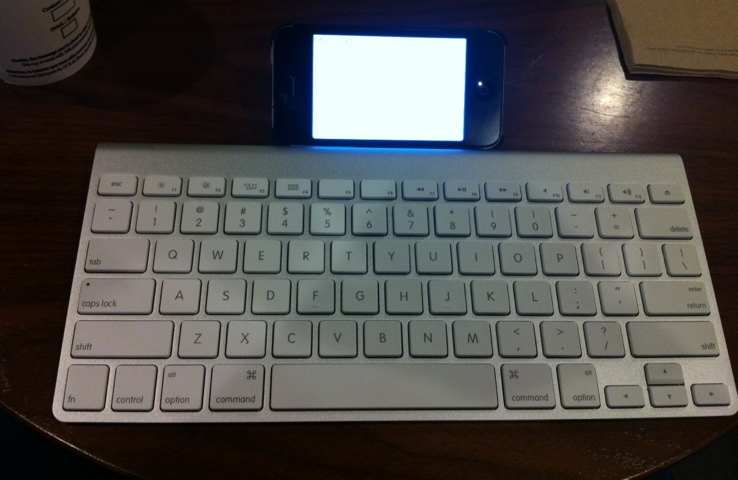
This is what your setup (smartphone with a bluetooth keyboard) would look like:

20120311-175532.jpg

However, if you want to do something rich in multimedia, watch movies or just edit photos, you might want to go for a tablet.

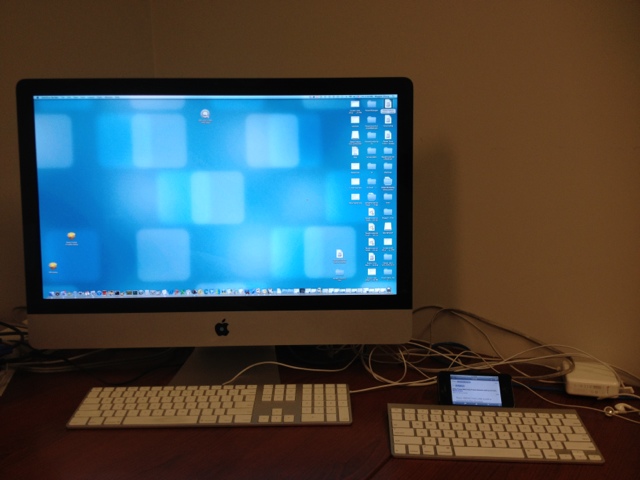
Comparing a large and small screen might seem funny, since this is what the comparison would look like:

20120311-175613.jpg

But you can’t really carry around your iMac, can you?

Another good device (which the ad classifies as both a tablet and a smartphone) is the Samsung Galaxy Note. The Samsung Galaxy Note is slightly bigger than smartphones but definitely smaller than a tablet.

Once devices like the Samsung Galaxy Note enter the market, the decision just gets more difficult. In a world where you need to decide between netbooks, laptops, tablets, and smartphones what would you call the Samung Galaxy Note?

The decision just became harder.

Netbook or Desktop?

A little while ago, I was facing a very classic dilemma. I had two distinctly useful but equally important options:

  • I need a netbook for traveling. A compact netbook, with a battery life of 8 hours or more suited my requirements perfectly. I could use it for surfing the Internet on WIFI when I am out and about.
  • I also need a desktop that is permanently attached to my printer. Whenever I need to print something, I don’t want to boot up my laptop, take it to the printer, plug it in, and print a few pages. I want a permanent kiosk-type setup where I could quickly surf the Internet when required and never have to wait for my laptop to boot up.

The dilemma was: which one should I get first? If I got the netbook, I would still have to go back and forth between the printer in the den and whatever room I happened to be in. If I got the desktop first, I would not have a computer when I travel. Obviously, I would not be using both at the same time.

After a lot of deliberation, I hit upon an idea: why couldn’t I have both? And so I set about putting together a custom-designed kiosk setup.

After buying the appropriate netbook, I set about collecting the remaining items:

  • An old monitor that I bought at a charity auction for $5. Finding a slim LCD monitor at that price point was the icing on the cake.
  • A new USB Keyboard and mouse that I bought from the local electronics store.
  • One of the many ethernet cables from the big box of wires in the attic.

Because I plan to leave the netbook plugged in at all times, I did not want the battery to die. To stop that from happening, I removed the battery from the netbook and stored it safely for use when I travel. I then plugged in the power directly to the netbook and attached the USB mouse, USB keyboard, and Ethernet cable (to the router). I finally connected the monitor to the VGA port.

Just like that, my kiosk was ready. The netbook is always on and serves as a printing or surfing station at home making it just like a desktop. When I travel, I just unplug all the wires, snap on the battery and take it with me.

With a little creative thinking, I finally have one computer that serves two purposes – netbook as well as a desktop.