Milk, Diapers, and an iPad

During my recent visit to the Apple store, I saw Apple experts demonstrating an iPad to a group of kids and their parents. I increasingly see kids holding iPads instead of toys. An iPad is expensive, and fragile. I was curious see how a 2-year old could use an iPad. Most importantly, I was also curious to see if an iPad App was simple to use for a kid.

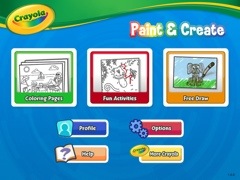
I downloaded Crayola Paint and Create – a free App for the iPad. I was interested in studying the features, user interface, user interaction, and the overall user experience. This is how the App looks:
20120421-192410.jpg

The main elements were Coloring Pages, Fun Activities and Free Draw. I decided to use Coloring pages and color a drawing:

20120421-192638.jpg

I clicked the Crayola icon at the bottom of the screen to display various types of crayons with different colors. You can see the following icons on the right: Pause (to pause the movements like snow falling or pause other interactive elements), Undo, Redo, New, Settings, Share (to share via email or on Facebook), Help, and Exit.

20120421-192912.jpg

This is how a partially colored coloring page looks:

20120421-193208.jpg

I could easily use different colors and fill different parts of the page with solid colors. This is how a fully colored page looks:

20120421-193451.jpg

The app is configured to use a finger by default. There is also a setting to use an iMarker instead of a finger (an iMarker is like a pencil that can be used with the iPad). Obviously, the Help and Settings are a little complicated for kids since they may not be able to read. Apart from Help, Settings, and Share, the other options were extremely easy to use.

What is Apple’s strategy to promote iPads for kids by launching a Kids Corner in the Apple store? What is the value proposition for parents to purchase such and expensive device for their kids? Here’s what I think:

Get an Apple user for life – That’s right. Catching them young will ensure they are Apple users for life! Kids will never choose an Android device or another tablet if they are introduced to the iPad at the age of 2. Apple’s strategy of catching users at a very young age will lead to huge revenue for years to come.

Reduce cost per user – The cheapest iPad costs approximately 400$. If a family of four – two parents and two kids use an iPad, the cost of buying an iPad is divided by 4. Although families do not use terms like Cost per User to decide whether to buy an iPad, they definitely calculate it sub-consciously.

Tap a new market segment – Kids are a huge market segment – not just for games, but also in the field of education. Tapping this market segment leads to a huge revenue for Apple.

Use kids to market the iPad and Apps – I was amazed to see how Apple was using kids to market the iPad. With the Share option, kids could share their coloring pages with their friends (the parents might share it for them). Other kids looking at these colorful pages would want to do the same. Not only is Social Media being introduced at a very young age, the iPad is being marketed via Word of Mouth (the most powerful way to influence prospective buyers).

Save money for families and schools – Families and schools can save money on paper, crayons, and other consumables required on a daily basis.

A safer option – Kids (at home or in Pre-K) eat crayons that may be harmful for their health. Since the crayons on an iPad are electronic, it is very safe for kids.

Save the environment – Reducing the usage of paper obviously save trees.

Crayola Paint and Create gave me great insights to Apple’s strategy. I could also envision the future – where most of the interaction happens through touch screens instead of keyboards. It also helped me realize that language will never be a barrier for user interaction since expressive icons are a great way to communicate with the user. Intelligence, knowledge, skills, language, and education will never be a barrier for users in the world of touch screens.

Hello kids, welcome to the iWorld!
Humans Are Obsolete!

My boss informed me that another employee was replacing me. The new employee was far better then me and would never take a day off. The new employee would never fall sick, never ask for overtime pay, and had nothing to do with the union. The new employee would not waste time near the water cooler socializing with other employees and would never waste time on Facebook. The new employee would never get stressed out, or have a nervous breakdown. The new employee would never get tired and will work tirelessly forever. Most importantly, the new employee will never get injured and sue the company for compensation.

Meet 1557. The new employee is a robot. This robot just replaced me in the warehouse today. This is the reality.

Amazon acquired Kiva Systems for 775 million. Kiva Systems makes robots for moving items in large warehouses. The task that was performed by humans will now be taken over by robots. All the fulfillment centers will implement the robotic systems designed by Kiva Systems as Amazon strives to be more efficient in this tough economy. Here is a really cool video about how these robots work independently in a warehouse.

Foxconn International Group – the company that manufactures smartphones for Apple and other companies – also plans to implement robotic systems to replace humans. This would resolve employee complaints of repetitive stress injury and employee suicides due to high stress.

Amazon has set a dangerous precedent that gives rise to critical questions:

  • Reliability – can we rely on untested technology that has not been around for long?
  • Security – how do we ensure that unauthorized users don’t take control of robots and wreak havoc?
  • Failsafe – what are the chances of Artificial Intelligence taking control of multiple robots? Is there a failsafe?
  • Ethical Issues – is it right to replace humans with robots? First, it was outsourcing, and then came the deadly recession, and now there is competition with Robots? It is obviously impossible for humans to compete with robots.

It would be disastrous if the software in robotic systems gets corrupted or is taken over by malware. Moreover, if Artificial Intelligence takes over the robots, we are doomed!

How do you fight an army of robots running berserk in the city?


Apple’s Art of War

Apple is the most valuable company in the world today. The main reason for Apple’s success (apart from great products) is how it fights in the mobile war. Apple uses the Guerrilla warfare strategy to make all its competitors bite the proverbial dust.

Strategy 1: Rise from the ashes with infinite wisdom

Guerrilla battle teams rise from the ashes of past defeat with the wisdom required to win. Apple was a fading company in the 90s. With the learning from previous failures, Steve Jobs’ leadership, and the launch of the iPod Classic, Apple rose from the ashes. The rest, as they say, is history.

Strategy 2: Remain hidden until it is ready to attack

Guerrilla battle teams are hidden until they attack the enemy. Similarly, Apple, with its absolute secrecy, ensures that its product strategy is always hidden. Its product lines, features, and components are always shrouded in absolute secrecy before launch. For example, nobody knew Siri was the key feature before iPhone 4S was launched.

Strategy 3: Use its weakness as a strength

Guerrilla battle teams use their weakness as strength. For example, they are small (weakness) and hence extremely mobile (strength). Unlike Windows, that can run on a variety of hardware Mac OS X could only run on the Mac hardware. This exclusivity was perceived as Apple’s biggest weakness. Today, because the iOS runs on iPhones, iPods, and iPads, it thus creates a common framework for Apple Apps. Across various Apple devices, Apple users have downloaded the apps over 25 billion times. This uniformity of hardware and operating system is now Apple’s biggest strength.

Strategy 4: Enjoy Public Support

Guerrilla battle teams enjoy public support – that’s why they win. Similarly, Apple has built a huge cult following over the years that it can tap into. Mac, iPhone and iPod users always remain loyal to Apple. This fan base is a huge plus for Apple since loyal users always upgrade to the newer versions of Apple products. For instance, have you ever heard of people standing in lines overnight for Android or BlackBerry devices?

Strategy 5: Grow stronger as the enemy grows weaker from within

Guerrilla battle teams draw their strength from the weakening enemy. This tendency is psychological as well as practical. As RIM constantly reduces the price of the BlackBerry Playbook, it shows that the BlackBerry Playbook is not worth the original price. HP shutting down its tablet business signifies defeat. The weakening and dying enemies help Apple grow stronger psychologically as well as in market share.

When Sun Tzu wrote the Art of War, I’m sure he did not think Apple would use it to reach the zenith of excellence and success!

Laptop, Netbook, Tablet or Smartphone?

The problem: I already have a desktop at home as my primary computer. I am trying to choose my secondary device to carry around with me. I am looking for something that I can travel with and also take with me to the local coffee shop. I am interested in social networking, writing blogs, Google Maps, and e-mails, but nothing much else.

Following are the options:

Laptop: Carrying a laptop has its own advantages and disadvantages. A laptop is a complete system with a lot of processing power. A good laptop has enough battery to last you a long time. With a large screen, and multiple programs installed, a laptop is a good workhorse to carry around on a day to day basis. On the downside, it is heavy, bulky, and comes with a lot of accessories that need to be carried around. The power cord, the laptop case, and the mouse (an optical mouse or a magic mouse for a Mac).

Netbook (Ultrabook): The best part of the netbook is its battery power. Most netbooks have a battery life of around 8 to 10 hours (the ASUS Eee PC 1000 HE). However, it has a small screen without a CD/DVD drive. A netbook is slower and mostly used for travel. A netbook is very compact, but can be used only for email or basic surfing. Once you start doing some advanced word processing or graphics, and the netbook starts stalling.

Tablet: A Tablet is a very good option IF you don’t need to type a lot. Most tablets are very good for multimedia, movies, and social networking. If you need to type a lot, you need to have an external keyboard. A tablet does not have tactile feedback and you don’t feel it when you have pressed a key. Some tablets can play a sounds when a key is pressed. Also, in some tablets, the key is highlighted when you press it. Other than that, there is no tactile feedback. A good bluetooth keyboard is very important for a tablet in case you need to do a lot of typing.

Smartphone: A Smartphone is a very good option if you want to make and receive calls (and stay connected to the Internet). You can use a smartphone for emails, social networking, and apps. The smartphone is always connected to the Internet. The best part of a smartphone is it does not need to be booted up like a netbook or a laptop. Since smartphones are basically phones, they are always ON. Using a bluetooth keyboard, you could always type a lot of long emails or blog posts. The screen is small, but with a slightly larger font, it would be readable from a distance, say top of a table.

Assuming you don’t want to invest in a laptop or a netbook and you want something as your ‘secondary’ device, a tablet or a smartphone can serve as a very good option.

How do you choose your secondary device? Here’s how you can decide. Which of the following features do you want to use the most?

  • Internet
  • Social Media
  • Games
  • News
  • Email
  • Blog
  • Camera
  • Movies

Once you zero down on what you want to do, we could probably choose the best device. Tablets are really cool since they can do all of the above (with an external keyboard of course!).

Let us assume you just want to type long emails or blog. And you also like to interact with people using Facebook. If you don’t want to watch movies or do anything advanced on your device, maybe a smartphone with a keyboard would be a good idea.

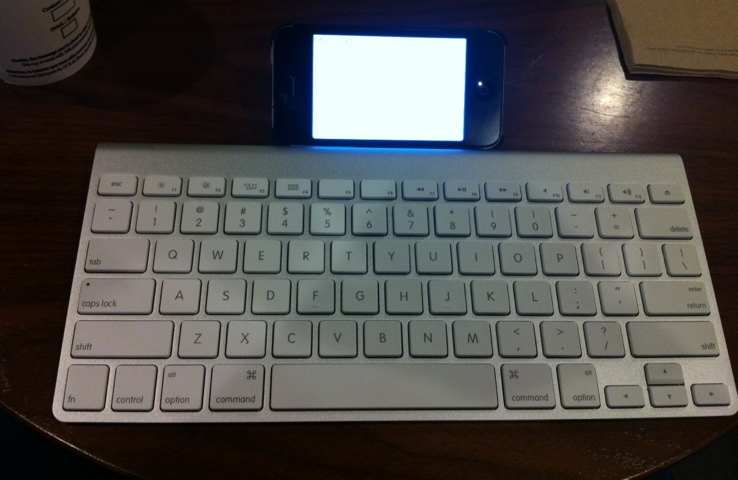
If you would just like to use the device for blog posts or long emails, it might be ok to have a small screen. You could just get a bluetooth keyboard and type away!

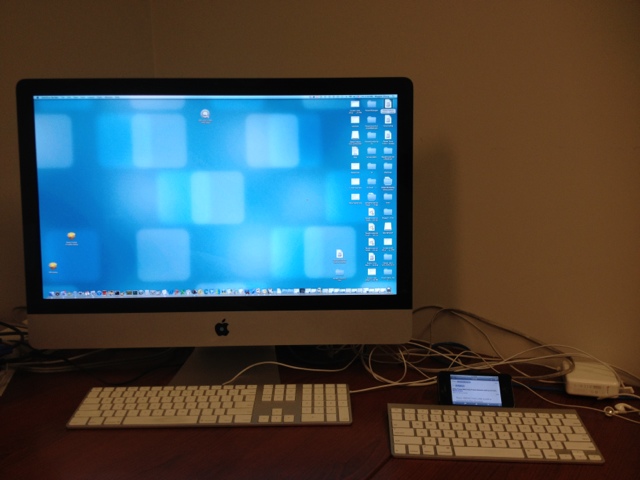
This is what your setup (smartphone with a bluetooth keyboard) would look like:

20120311-175532.jpg

However, if you want to do something rich in multimedia, watch movies or just edit photos, you might want to go for a tablet.

Comparing a large and small screen might seem funny, since this is what the comparison would look like:

20120311-175613.jpg

But you can’t really carry around your iMac, can you?

Another good device (which the ad classifies as both a tablet and a smartphone) is the Samsung Galaxy Note. The Samsung Galaxy Note is slightly bigger than smartphones but definitely smaller than a tablet.

Once devices like the Samsung Galaxy Note enter the market, the decision just gets more difficult. In a world where you need to decide between netbooks, laptops, tablets, and smartphones what would you call the Samung Galaxy Note?

The decision just became harder.

Cluttered geekery: how many gizmos are quite enough?

Today’s markets are flooded with gadgets and gizmos of every possible variety. While we want to believe otherwise, a surprising number of these gizmos make their way into most homes. Take, for example, a household with two adults and two children under the age of 10. Assuming an annual household income of $60,000 or more, the number of gadgets and gizmos in the house may run to:

  • One computer per adult and at least one computer shared by the two children
  • One printer, scanner, copier, and fax machine
  • One or more gaming system per child
  • One or more gaming system per adult
  • At least one mobile phone per adult
  • One mp3 player or iPod-type device per child
  • One or more ebook reader or tablet per adult
  • One Voice-over-IP (voip) and one landline phone system
  • At least one high-tech entertainment system consisting of a television, bluray player, speaker system, and other peripherals

That is about 24 devices for just four people. The number is much, much higher for a household where one or more adults work in the high-tech industry, also known as the IT industry.

The question, then, is whether we need so many devices or whether we should try to return to a simpler time. Ask anyone and they may say: “Oh, life was so much simpler back then. But, I can’t imagine life without my (insert gizmo name of choice).” We, as a people, have become quite dependent upon our devices. We go so far as to name them after our favorite characters. Much as our grandparents collected pet cats-dogs-horses, we collect gizmo-pets. Charming as it may seem, this tendency to personify our devices and grow attached to them at the hip is working against us. Our lives are getting more and more cluttered with unnecessary items that edge out the items we really do need.

The answer to the question `how many of these devices do we really need?`is quite simply `not so many`. Let’s look at that list to see if we can’t cut it down to a more manageable number:

If you look at the previous list, the household only needs one computer for everyone.

  • One computer per adult and at least one computer shared by the two children: Just one computer is enough. Why not set up a kiosk in a study or den area where different people can use the computer at different times? The chances that two people need to use the computer are quite slim. There is no point in preparing for a “computing emergency” by stockpiling computers. If the children do need their own personal computer, think about getting them a tablet device instead. Those Samsung Galaxy tabs or iPads are useful for more than just playing games or watching videos.
  • One printer, scanner, copier, and fax machine: The easiest way is to have a device that can do all four things. You have just cut down your device needs to a quarter of your original needs.
  • One or more gaming system per child and adult: Another out-of-the-box idea is to set up a gaming network within your home. Use your entertainment system to set up a family game room where everyone uses the same gaming system. There is no need to have mom’s fitness game, dad’s shoot-em-up game, or the kids’ learning games set up on different systems. Find one system that does it all, and reuse it for everyone. If this process helps you find a happy medium where everyone spends more time together as a family, it’s a win all around.

Just by consolidating a few devices, we went from 24 items to less than 10.

Apart from the obvious benefit of reducing clutter in our homes and living spaces, we can also help the environment by cutting down on our electricity consumption.

And that’s why I think that instead of making unachievable resolutions like “lose 20 pounds by May”, we must make a resolution to cut down on the number of devices that we own and with which we clutter our lives.

The well-connected world

If someone from the 1960s were to visit us today, the first, but not really the only, thing that would blow them away is how well-connected everyone is with everyone and everything else.

We are Facebook friends with people we barely spoke to in high school. We follow celebrities, who don’t know us from Adam, on Twitter. We join online forums and fandoms to discuss intimate details of our interests with like-minded individuals. We give instant feedback about the movies we see or the song that we just heard for the first time. We share photographs from our lives with perfect strangers on photo-sharing websites, hoping to learn some never before understood photography technique. We take seconds to open a browser and search for the information we need. We are able to get “expert” opinions from people on the Internet on whether that soreness in our back is because of sitting too long or is something horrible like a slipped vertebrae.

And yet, we are moving farther away from what defines us as a people.

We are losing touch with doing things just for the fun of doing them. How many of our Facebook friends have said “pictures or it didn’t happen!” for a status update about something amazing that we did? And so we feel obliged to add pictorial evidence of having gone scuba-diving or rock-climbing. Such a fun statement, and yet the sentiment behind that statement reveals an awful undercurrent: if the world doesn’t know what we are doing, we are not doing anything worthwhile.

We are losing our ability to collect, retain, and process information. That Wikipedia page explaining backaches may get us to exclaim “awesome!” but how much of it do we really retain? We read that page, and then go back to sitting on that really horrid couch while slouching in an attempt to get comfortable.

We are growing apart from what connects us with the people around us. No doubt, there is merit in being able to talk to other fans and collectively squee about a book from our favorite author. But the time that we spend on that fandom website is time that we have taken away from the real people around us. Telling 200 Twitter followers that “This new restaurant is a gastronomical delight!” is not quite the same as telling your friends “This new restaurant is amazing, let’s go eat there sometime.” Arguably, you could say that on Twitter, but do you really want a random guy living 5 states away showing up at the restaurant when you are waiting for friends?

We live in a world of information overload. Each one of us feels the need to be connected with the world every hour of every day. None of us can imagine life without updating our Facebook and Twitter feeds with–sometimes irrelevant–information. The question that the guy visiting you from the 1960s is going to ask is: “whatever happened to good old going outside and throwing a ball around with friends?” And that is the question we need to ask ourselves as well.

May be what we need to do, is to take a step back and disconnect from the online world and connect with the real world.

An Apple a day for every age

I was wondering why Apple is more successful than other companies out there. Why is Apple’s growth phenomenal even through the recession? What is it that Apple is doing right? What is Apple’s mantra for continuous success?

I have heard many reasons for Apple’s success such as: Apple has a cult following, People are crazy about Apple products, Apple is a good marketer, Apple’s secrecy is the reason for success, and the very best It was only because of Steve Jobs’ charisma.

There is a perfectly logical reason for Apple’s success. Let’s analyze what Apple is doing differently. Apple creates both hardware and the software for that hardware. The hardware specifications for each device type (smartphone, tablet) are exactly the same. When programmers write the code for the software, they have a uniform hardware platform to work with such as CPU, memory, or GPU. As a result, they are able to create a uniform operating system. A uniform hardware and a uniform operating system lead to a Uniform User Experience.

Android is an awesome operating system. However, the Android market is extremely fragmented with multiple hardware devices and hence, developers need to write different drivers for different hardware specifications. Screen resolution, input buttons, processing speed, memory, and Internet speeds are widely different for different Android devices. Android, in spite of being an amazing operating system, is thus unable to provide a uniform User Experience across all its devices like Apple.

While writing code for Apple apps, programmers can work with very uniform hardware and operating system specifications. However, for Android Apps, multiple devices and multiple operating systems need to be considered. It may not be possible for the Android apps to be tested and optimized for every hardware device out there.

But what does a Uniform User Experience mean for the success of the company? How does a Uniform User Experience translate to becoming the world’s most valuable company? How does a Uniform User Experience translate to a 100 billion dollar cash hoard?

The uniform programming environment and a Uniform User Experience has led to apps being used by a wide demographic/age groups finally leading to 25 billion downloads from the Apple App Store:

  • 2-3 years – Crayola Apps and devices for the iPad are used for kids to draw and enhance their creativity. Technology is being used at such a young age to do the same thing that was done using colors and papers.
  • 3-5 years – iPad is now being used in PreK and Kindergarten to teach kids the basic stuff that was being taught using a whiteboard. A Uniform User Experience ensures that each kid is learning the same way using the iPad. Toys are also a great hit amongst kids. (See Disney’s Cars Toys and App for the iPad)
  • 6-10 years – iPad and iPod touch are used by children to learn subjects like Math and Science. The interactivity boosts their interest and helps them learn. Each child using the same App learns in the exact same way. (Check out the Solar walk 3D App)
  • 10-16 years – Games are a huge hit in this age group. Thousands of games are being used today by pre-teen and teens today.
  • 16-20 years – Social networking and music are a great hit. Again, the User Experience is uniform across all devices for the same App.
  • 20+ years – News, Cooking, Games, Social networking, Music, Utilities and thousands of apps for every age is available today. Each App provides a Uniform User Experience for all users.

Android is a formidable opponent for the iOS. If there was a single hardware device (say Samsung Galaxy II, or Samsung Galaxy Tab), with a streamlined and exhaustively uniform Android operating system, the landscape of the mobile market could be very different today.

Meanwhile, there’s always an Apple App a day for every age.