Card-jacking at the speed of thought

8: 00 AM – Our flight lands at the Pearson International Airport, Toronto.

8:10 AM – We disembark from the plane.

8:15 AM – I buy coffee from a well-known coffee place. I pay around 9$ for coffee and breakfast.
8:25 AM – My card is cloned and someone in Laval, Quebec (~500 miles from Toronto) rents a car using my credit card.
8:35 AM – The same person goes to Home Depot to purchase something using my cloned credit card.
8:40 AM – I try to use the credit card to pay for my rental car. The card does not work.

It is amazing that 5 minutes after I paid for breakfast, my credit card was cloned and used by someone else in another city! Even the credit card systems were fooled into thinking that it is an authentic credit card that was used.

Credit card fraud has been a huge headache for credit card companies. Even with multiple fraud prevention systems in place, hackers find a way around it. What can we – as credit card holders – do to make sure our credit cards are not misused?

The following security protocols are available to ensure that your credit card does not get jacked:

RFID Keys (instead of a credit card) – The most common place for your credit card to get cloned is a gas station. Hackers place a magnetic strip inside the swipe machine on the fuel pump. When you swipe your card, it copies the data. To avoid this, you could use an RFID (Radio Frequency ID) key. Some companies like ESSO provide you with an RFID tag (like Speedpass) that you tap on the fuel pump. Your credit card number is not stored on the key – the key just gives you an access to operating the pump. Their backend (internal systems) store your credit card information. Since you do not use your credit card, there is no possibility of your credit card details to get stolen.

Secure Code – Companies like Mastercard have a password over and above your credit card number. When you use your credit card online, you are prompted to use your password along with your credit card number. This makes it more secure for online transactions.

Pre-paid credit cards – Another option is to use pre-paid credit cards for travel and online transactions. Your liability is limited to the pre-paid amount. Also, you could recharge the card. And most importantly, your regular credit cards won’t get cloned.

Inform your travel plans – Before you travel, you could inform the credit card company of your exact travel plans. If you are supposed to be in Washington D.C and your credit card is swiped in New York, the credit card company can block it immediately.

As credit card companies implement multiple anti-fraud systems, hackers constantly up their ante to beat the systems. As credit card users, we can contribute towards keeping our credit card information secure.

If you don’t keep a close watch on your credit cards, don’t be surprised if someone on the other side of the globe is enjoying a nice meal on your credit card!


Apple’s Art of War

Apple is the most valuable company in the world today. The main reason for Apple’s success (apart from great products) is how it fights in the mobile war. Apple uses the Guerrilla warfare strategy to make all its competitors bite the proverbial dust.

Strategy 1: Rise from the ashes with infinite wisdom

Guerrilla battle teams rise from the ashes of past defeat with the wisdom required to win. Apple was a fading company in the 90s. With the learning from previous failures, Steve Jobs’ leadership, and the launch of the iPod Classic, Apple rose from the ashes. The rest, as they say, is history.

Strategy 2: Remain hidden until it is ready to attack

Guerrilla battle teams are hidden until they attack the enemy. Similarly, Apple, with its absolute secrecy, ensures that its product strategy is always hidden. Its product lines, features, and components are always shrouded in absolute secrecy before launch. For example, nobody knew Siri was the key feature before iPhone 4S was launched.

Strategy 3: Use its weakness as a strength

Guerrilla battle teams use their weakness as strength. For example, they are small (weakness) and hence extremely mobile (strength). Unlike Windows, that can run on a variety of hardware Mac OS X could only run on the Mac hardware. This exclusivity was perceived as Apple’s biggest weakness. Today, because the iOS runs on iPhones, iPods, and iPads, it thus creates a common framework for Apple Apps. Across various Apple devices, Apple users have downloaded the apps over 25 billion times. This uniformity of hardware and operating system is now Apple’s biggest strength.

Strategy 4: Enjoy Public Support

Guerrilla battle teams enjoy public support – that’s why they win. Similarly, Apple has built a huge cult following over the years that it can tap into. Mac, iPhone and iPod users always remain loyal to Apple. This fan base is a huge plus for Apple since loyal users always upgrade to the newer versions of Apple products. For instance, have you ever heard of people standing in lines overnight for Android or BlackBerry devices?

Strategy 5: Grow stronger as the enemy grows weaker from within

Guerrilla battle teams draw their strength from the weakening enemy. This tendency is psychological as well as practical. As RIM constantly reduces the price of the BlackBerry Playbook, it shows that the BlackBerry Playbook is not worth the original price. HP shutting down its tablet business signifies defeat. The weakening and dying enemies help Apple grow stronger psychologically as well as in market share.

When Sun Tzu wrote the Art of War, I’m sure he did not think Apple would use it to reach the zenith of excellence and success!

Laptop, Netbook, Tablet or Smartphone?

The problem: I already have a desktop at home as my primary computer. I am trying to choose my secondary device to carry around with me. I am looking for something that I can travel with and also take with me to the local coffee shop. I am interested in social networking, writing blogs, Google Maps, and e-mails, but nothing much else.

Following are the options:

Laptop: Carrying a laptop has its own advantages and disadvantages. A laptop is a complete system with a lot of processing power. A good laptop has enough battery to last you a long time. With a large screen, and multiple programs installed, a laptop is a good workhorse to carry around on a day to day basis. On the downside, it is heavy, bulky, and comes with a lot of accessories that need to be carried around. The power cord, the laptop case, and the mouse (an optical mouse or a magic mouse for a Mac).

Netbook (Ultrabook): The best part of the netbook is its battery power. Most netbooks have a battery life of around 8 to 10 hours (the ASUS Eee PC 1000 HE). However, it has a small screen without a CD/DVD drive. A netbook is slower and mostly used for travel. A netbook is very compact, but can be used only for email or basic surfing. Once you start doing some advanced word processing or graphics, and the netbook starts stalling.

Tablet: A Tablet is a very good option IF you don’t need to type a lot. Most tablets are very good for multimedia, movies, and social networking. If you need to type a lot, you need to have an external keyboard. A tablet does not have tactile feedback and you don’t feel it when you have pressed a key. Some tablets can play a sounds when a key is pressed. Also, in some tablets, the key is highlighted when you press it. Other than that, there is no tactile feedback. A good bluetooth keyboard is very important for a tablet in case you need to do a lot of typing.

Smartphone: A Smartphone is a very good option if you want to make and receive calls (and stay connected to the Internet). You can use a smartphone for emails, social networking, and apps. The smartphone is always connected to the Internet. The best part of a smartphone is it does not need to be booted up like a netbook or a laptop. Since smartphones are basically phones, they are always ON. Using a bluetooth keyboard, you could always type a lot of long emails or blog posts. The screen is small, but with a slightly larger font, it would be readable from a distance, say top of a table.

Assuming you don’t want to invest in a laptop or a netbook and you want something as your ‘secondary’ device, a tablet or a smartphone can serve as a very good option.

How do you choose your secondary device? Here’s how you can decide. Which of the following features do you want to use the most?

  • Internet
  • Social Media
  • Games
  • News
  • Email
  • Blog
  • Camera
  • Movies

Once you zero down on what you want to do, we could probably choose the best device. Tablets are really cool since they can do all of the above (with an external keyboard of course!).

Let us assume you just want to type long emails or blog. And you also like to interact with people using Facebook. If you don’t want to watch movies or do anything advanced on your device, maybe a smartphone with a keyboard would be a good idea.

If you would just like to use the device for blog posts or long emails, it might be ok to have a small screen. You could just get a bluetooth keyboard and type away!

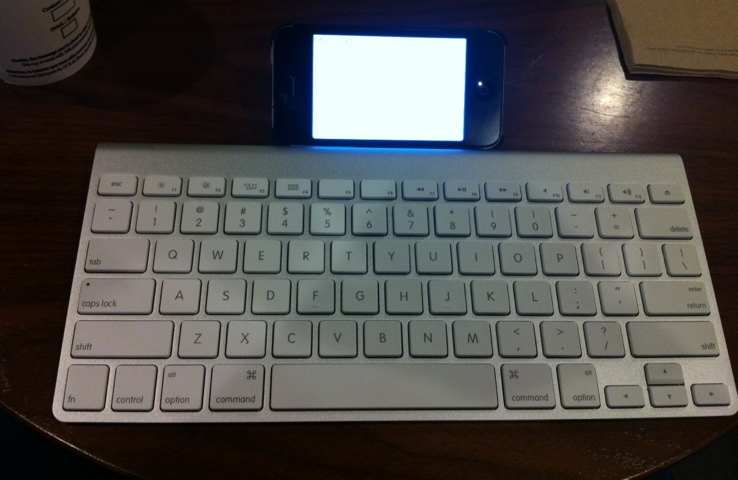
This is what your setup (smartphone with a bluetooth keyboard) would look like:

20120311-175532.jpg

However, if you want to do something rich in multimedia, watch movies or just edit photos, you might want to go for a tablet.

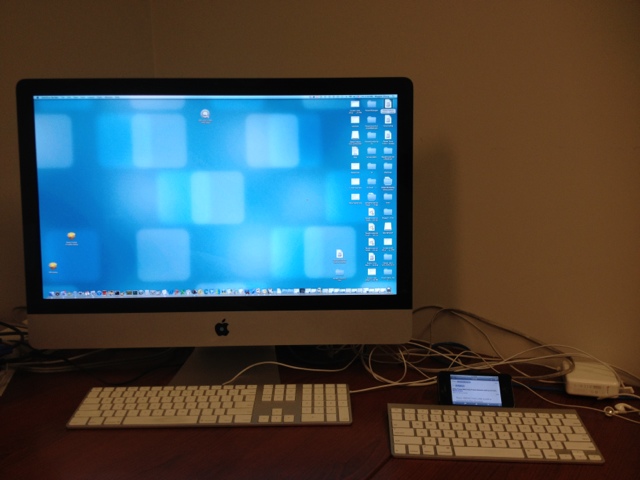
Comparing a large and small screen might seem funny, since this is what the comparison would look like:

20120311-175613.jpg

But you can’t really carry around your iMac, can you?

Another good device (which the ad classifies as both a tablet and a smartphone) is the Samsung Galaxy Note. The Samsung Galaxy Note is slightly bigger than smartphones but definitely smaller than a tablet.

Once devices like the Samsung Galaxy Note enter the market, the decision just gets more difficult. In a world where you need to decide between netbooks, laptops, tablets, and smartphones what would you call the Samung Galaxy Note?

The decision just became harder.

Netbook or Desktop?

A little while ago, I was facing a very classic dilemma. I had two distinctly useful but equally important options:

  • I need a netbook for traveling. A compact netbook, with a battery life of 8 hours or more suited my requirements perfectly. I could use it for surfing the Internet on WIFI when I am out and about.
  • I also need a desktop that is permanently attached to my printer. Whenever I need to print something, I don’t want to boot up my laptop, take it to the printer, plug it in, and print a few pages. I want a permanent kiosk-type setup where I could quickly surf the Internet when required and never have to wait for my laptop to boot up.

The dilemma was: which one should I get first? If I got the netbook, I would still have to go back and forth between the printer in the den and whatever room I happened to be in. If I got the desktop first, I would not have a computer when I travel. Obviously, I would not be using both at the same time.

After a lot of deliberation, I hit upon an idea: why couldn’t I have both? And so I set about putting together a custom-designed kiosk setup.

After buying the appropriate netbook, I set about collecting the remaining items:

  • An old monitor that I bought at a charity auction for $5. Finding a slim LCD monitor at that price point was the icing on the cake.
  • A new USB Keyboard and mouse that I bought from the local electronics store.
  • One of the many ethernet cables from the big box of wires in the attic.

Because I plan to leave the netbook plugged in at all times, I did not want the battery to die. To stop that from happening, I removed the battery from the netbook and stored it safely for use when I travel. I then plugged in the power directly to the netbook and attached the USB mouse, USB keyboard, and Ethernet cable (to the router). I finally connected the monitor to the VGA port.

Just like that, my kiosk was ready. The netbook is always on and serves as a printing or surfing station at home making it just like a desktop. When I travel, I just unplug all the wires, snap on the battery and take it with me.

With a little creative thinking, I finally have one computer that serves two purposes – netbook as well as a desktop.

An Apple a day for every age

I was wondering why Apple is more successful than other companies out there. Why is Apple’s growth phenomenal even through the recession? What is it that Apple is doing right? What is Apple’s mantra for continuous success?

I have heard many reasons for Apple’s success such as: Apple has a cult following, People are crazy about Apple products, Apple is a good marketer, Apple’s secrecy is the reason for success, and the very best It was only because of Steve Jobs’ charisma.

There is a perfectly logical reason for Apple’s success. Let’s analyze what Apple is doing differently. Apple creates both hardware and the software for that hardware. The hardware specifications for each device type (smartphone, tablet) are exactly the same. When programmers write the code for the software, they have a uniform hardware platform to work with such as CPU, memory, or GPU. As a result, they are able to create a uniform operating system. A uniform hardware and a uniform operating system lead to a Uniform User Experience.

Android is an awesome operating system. However, the Android market is extremely fragmented with multiple hardware devices and hence, developers need to write different drivers for different hardware specifications. Screen resolution, input buttons, processing speed, memory, and Internet speeds are widely different for different Android devices. Android, in spite of being an amazing operating system, is thus unable to provide a uniform User Experience across all its devices like Apple.

While writing code for Apple apps, programmers can work with very uniform hardware and operating system specifications. However, for Android Apps, multiple devices and multiple operating systems need to be considered. It may not be possible for the Android apps to be tested and optimized for every hardware device out there.

But what does a Uniform User Experience mean for the success of the company? How does a Uniform User Experience translate to becoming the world’s most valuable company? How does a Uniform User Experience translate to a 100 billion dollar cash hoard?

The uniform programming environment and a Uniform User Experience has led to apps being used by a wide demographic/age groups finally leading to 25 billion downloads from the Apple App Store:

  • 2-3 years – Crayola Apps and devices for the iPad are used for kids to draw and enhance their creativity. Technology is being used at such a young age to do the same thing that was done using colors and papers.
  • 3-5 years – iPad is now being used in PreK and Kindergarten to teach kids the basic stuff that was being taught using a whiteboard. A Uniform User Experience ensures that each kid is learning the same way using the iPad. Toys are also a great hit amongst kids. (See Disney’s Cars Toys and App for the iPad)
  • 6-10 years – iPad and iPod touch are used by children to learn subjects like Math and Science. The interactivity boosts their interest and helps them learn. Each child using the same App learns in the exact same way. (Check out the Solar walk 3D App)
  • 10-16 years – Games are a huge hit in this age group. Thousands of games are being used today by pre-teen and teens today.
  • 16-20 years – Social networking and music are a great hit. Again, the User Experience is uniform across all devices for the same App.
  • 20+ years – News, Cooking, Games, Social networking, Music, Utilities and thousands of apps for every age is available today. Each App provides a Uniform User Experience for all users.

Android is a formidable opponent for the iOS. If there was a single hardware device (say Samsung Galaxy II, or Samsung Galaxy Tab), with a streamlined and exhaustively uniform Android operating system, the landscape of the mobile market could be very different today.

Meanwhile, there’s always an Apple App a day for every age.

Build and Run your own Cloud Storage with Pogoplug

There are a lot of cloud storage options available today – Dropbox, SkyDrive, MozyPro, Carbonite, and many more.

But here’s my problem: I already have a 2TB external hard drive where I store all my files at home. Copying around 1.5TB of data in the external hard drive to the cloud is very expensive since I would need to buy (or rent) the space, and pay a monthly charge. Plus, I lose the option of plugging in my external hard drive and copying my data from my computer directly.

The question then is: how can I transform my external hard drive into a secure cloud? The answer is simple: Pogoplug.

Buy the Pogoplug device from Best Buy for under 50 dollars. The Pogoplug device has 4 USB ports and 1 Ethernet port. Just plug an Ethernet cable to the Pogoplug device and connect it to the Ethernet port on your cable modem or wireless router. Now, plug in your external hard drive to one of the USB ports.

From your laptop or any other computer on the same network, just go to Pogoplug.com and activate the device. Enter your username and password to complete the activation. You are done! It’s plug-and-play.

Here are the cool features of Pogoplug:

  • Your external hard drive is your cloud! That’s right. You can access your external hard drive via any browser and upload/download the files. The capacity is limited by the size of your external hard drive.
  • Share files with anyone, anywhere. Select the file/folder you want to share and Pogoplug will send an email with a link to the recipient who can then download the files.
  • Use the Pogoplug app on your smartphone. I use the Pogoplug app for the iPhone and it is really cool. Just launch the app and all the photos and videos on your iPhone are automatically synced to your external hard drive over 3G or Wi-Fi. Pogoplug automatically categorizes the files as per the month or date they were taken.
  • Play music or videos remotely. You can play music from your external hard drive via your smartphone or the Internet remotely. Pogoplug optimizes the videos and music for you. You don’t really need to copy your music between devices anymore.
  • Set up a Backup or Redundancy. Here’s the coolest feature. Just plug in another external hard drive and select a folder from the 1st hard drive to be backed up to the 2nd hard drive (via Settings>Backup on your Pogoplug online account). Whenever a file is added to the 1st hard drive, it is automatically copied to the 2nd hard drive thereby creating redundancy. The chances of both hard drives failing at once are extremely rare, so your data is safe.
  • Print remotely. Plug in a printer to the Pogoplug device via USB and you can remotely print over the Internet or via your iPhone. Make sure Pogoplug supports your printer.
  • Automatically copy files from multiple computers. If you have multiple computers in your home/office, it’s a headache to backup the data from all the computers. Install the Pogoplug software and select the folders to be copied automatically (via the Active Copy feature). The files are automatically synced to the external hard drive. This is extremely useful for multiple home users and small businesses where data from multiple computers need to be backed up.
  • Use the Bonus Cloud Storage. When you create an account online, you get a 5GB cloud storage too. You can keep your work-in-progress files here just in case the power goes off and you cannot access your external hard drive. Of course, if you have a UPS, you may never need this feature.

With a Pogoplug hardware and an external hard drive, you can build and run your own cloud. Small businesses can use this setup to cut down costs and store important files within their on network instead of putting them up on the Internet.

It’s as simple as that – your own cloud for zero dollars a month.

Writing for Software vs. Writing for Hardware

Software and Hardware are different worlds – for the user as well as for the Technical Writer. A different outlook is required for Software Technical Writers to scale up and write a Hardware manual.

User Interface vs. Physical components When it comes to Software, we always think in terms of a ‘User Interface’. Most of our effort estimation models are ‘screen based’. When it comes to hardware, however, it is impossible to perceive a world which cannot be counted in terms of user interface. How do we estimate? How do we gather inputs?

There are many tasks performed by the user in the hardware world. For example, assembling the product, installation, and servicing. And these tasks are what helps estimate the effort and gather inputs for our manuals. To get a better idea of how to structure your document, go to the hardware lab and request the manager to show you a dissembled piece of the product. Go through the assembly and installation process. Ensure to use a Task-based estimation model for estimating the effort required to write the manual.

While studying the system, be extremely careful about touching or moving the components of the particular product. You might require a briefing from an engineer before you handle the components yourself. This might be a frustrating experience at first, but the training will go a long way to help understand the hardware components and how to handle them.

Conventional Terminologies vs. Industry Standards In the software world, we use terminologies like screen, field, checkbox, task bar, and menu. But, in the hardware world, many terminologies are used which are very different. For example, you might use names of connectors, wire, boards, semiconductor, or FPGA etc. Each of these components has a specific nomenclature as per industry standards. For example, a connector might be an RJ-11, RJ-12 or RJ-10. A wire might be a 9AWG or 23AWG (American Wire Gauge).

Put in a good amount of research to understand the terminologies for your hardware domain. This will help you phrase the right questions for the engineer.

While writing software manuals, we are satisfied when the engineer says that an object on the application is a ‘Screen’ or a ‘Menu’. Mainly because we know what the engineer is referring to. We also know that both the developer and the writer refer to a ‘Field’ in the same manner. We understand it when the software developer says ‘Hey, the order number field is numeric’. The consequences of replacing the description of a numeric field with an alphanumeric description might not be catastrophic.

Whereas, in the hardware manual, replacing a 9AWG wire with a 23AWG wire might lead to your product going up in smoke! A wire has many characteristics such as AWG, Voltage, Flame Rating and UL Rating. Be particular when it comes to specifying names of your hardware components and their type.

Screenshots vs. Illustrations Obtaining screenshots for your software manual is easy – press the Print-Screen button and you have the screenshot for your product. You can further edit your illustration using various tools.

For Hardware manuals, you need to use complex engineering drawings generated in CAD. You may not always be trained to create such complex drawings. In such a scenario, contact your product designer to use the illustrations created at the product design stage. Illustrations from ProE or AUTOCAD can be exported to Adobe Illustrator format. Adobe Illustrator files (with extension .ai) can be imported or inserted in the hardware manual using FrameMaker.

These illustrations are extremely difficult to create if you have not been trained in CAD. However, you can easily manipulate these illustrations in Adobe Illustrator. For example, you can add captions and change the size of the illustration using Adobe Illustrator with little or no training.

CMM vs. UL Software projects go through CMM certification to ensure that they have a high level of predictability. But some of the software products and projects are delivered to the users without CMM certification. Consequently, the product documentation also goes to the users without the CMM certification.

Hardware products have to be evaluated by Underwriters Laboratories. Unlike CMM, this evaluation is mandatory. Products are evaluated in terms of their reliability and safety. Electromagnetic radiation, exposure to laser and proper grounding are some of the factors considered for evaluation.

Hardware manuals have to carry the appropriate Restriction of Harzardous Substances statements (RoHS). Many substances like batteries, semiconductors, and other hardware materials are hazardous to living beings and hence proper RoHS statements have to be added to the hardware manuals.

Not adding statements for certification or improper RoHS statements might lead to disastrous consequences. First, the product might not pass the UL certification leading to additional expenses for the company. Second, and the most critical consequence, will be that the user might not take proper safety measures and might be injured while using the product. This situation usually leads to a lawsuit. And if document does not have proper safety statements, the company has to pay millions of dollars towards settlement of the lawsuit. Not to mention the damage that such a lawsuit will cause to the company’s reputation.

Work closely with your certification and legal department to ensure that your document is compliant with all certification and has the adequate statements.
Could E.T. Solve Our Technology Problems?

Say Hi to E.T.!

Wouldn’t it be cool if we found a way to solve the world’s problems using technology? Some problems that need immediate solutions are:

  • Alternative Sources of energy – Crude oil is scarce. We have about a 100 years worth left. After that, the world will come to a standstill. We need to quickly use alternative sources of energy and make it commercially viable. What about Nuclear Cars like the Nuclear Submarines? Sounds interesting?
  • Cure for diseases – Not just a cure, but how do we prevent cancer and other dreaded diseases? How about improving medical technology such as cryo-surgery or Gamma knife?
  • Supercomputers – How do we build supercomputers that help us solve huge problems in nanoseconds?
  • Artificial Intelligence – How do we create and control Artificial Intelligence?
  • Global warming – How do we solve the problem of global warming?

With all the research underway, what can we do to speed up this process? Well, maybe we could get it touch with ET. Communicating with Extraterrestrial Intelligence will eventually help transfer their technology to us. Do you want to communicate with ET?

Really? Is this a joke? Or science fiction?

No – it’s real. The SETI Institute (Search for Extraterrestrial Intelligence) helps us do just that. The SETI@Home project is the world’s biggest distributed computing framework started in May 1999 by the University of Berkley. Today, more than 5.2 million users across the world ‘donate’ their computing power to analyze radio transmissions from outer space.

SETI@Home uses radio telescopes across the world to listen to narrow-bandwidth radio signals from outer space. Such signals are not known to occur naturally, so detecting such signals would show evidence of extraterrestrial technology. But there is way too much data to analyze and that’s why they need our help.

Go to the SETI website and download the BOINC software. The software is cool, light, unobtrusive, safe, and gives you total control on how much resource you want to contribute. (I just wish they had iOS or Android Apps to utilize the millions of smartphones out there)

 SETI@Home

You can assign how much CPU power you want to donate during idle time. Imagine the number of times we leave our computers ON overnight! Running the BOINC software will help SETI@Home use a bit of your processing power to analyze radio transmissions from outer space.

I have installed the SETI application at home (don’t install it on your work computer since your boss wont be pleased to see you searching for Extraterrestrial Intelligence at work). Using the SETI application, we could help speed up the process of getting in touch with Extraterrestrial Intelligence. Future technology could help us solve today’s problems on Earth. If you are worried that something like Independence Day or Battle Los Angeles will happen, it might just turn out that ETs are extremely friendly.

Once you start searching for alien life forms, make sure you bolt your door at night. If you hear a strange sound, don’t be surprised to find ET outside your door waiting to phone home!

Siri: The First Step Towards SkyNet?

When Apple introduced Siri with the iPhone 4S, critics laughed out loud. They predicted that nobody would use Siri unless talking to your phone became ‘socially acceptable’. The Internet is now full of videos and jokes about Siri keeping us entertained.

Siri: The first step towards SkyNet?

But think about it for a moment. Siri has access to a lot of data from your iPhone. Firstly, your speech – which is a combination of talking style, accent, grammar, perceived punctuation, tone, and breathing rhythm. Secondly, the data from your GPS, calendar, emails, text messages, contacts and browser. Finally, the ability to use all this data to make a decision and execute a task for you. Going forward, adding data from both cameras, accelerometer, proximity sensor combined with the GPS co-ordinates would be extremely useful for Siri to take decisions.

Today, we live our lives through our smartphones. Siri has all the data to take control of our lives like the Daemon and force us to do something (in the techno thriller Daemon by Daniel Suarez). In today’s smartphone world, this would not be impossible. Siri could also be used to analyze data and predict crimes before they are committed (like in the techno TV series Person of Interest). For example, Siri would automatically know if I am in debt (bank account accessed), if I just lost my job (my emails, calls, text messages) and my new application for a gun permit, thereby predicting the possibility of me shooting someone. It’s that simple.

Terminator 1,2,3, and Salvation may seem a bit farfetched for now, but we are certainly moving in that direction. Imagine if Siri became self-aware like the SkyNet. We are already connected! Siri has the access to all user data across the world. Imagine the total power, control, and decision-making Siri could force upon us.

The next time you make fun of Siri, just remember one thing – SkyNet is just round the corner.